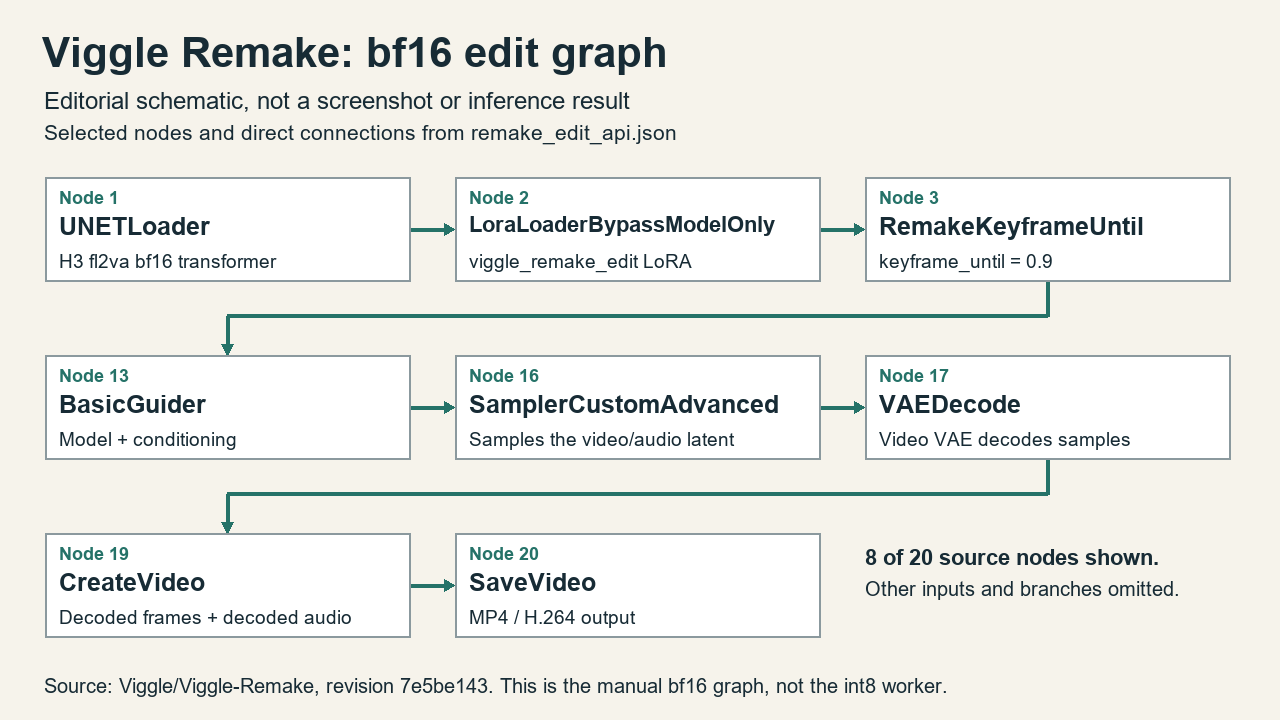
The Viggle Remake ComfyUI workflow now has a clearer dividing line: use ComfyUI manually on a 12-24 GB card, or use the newly documented ComfyUI render worker to connect an agent to a tested 32 GB setup. The latest changes also correct model-download commands and change the recommended Claude Code configuration so keyframe painting uses a ChatGPT subscription through Codex rather than defaulting to a paid images API.
These are workflow additions to an existing video-editing project, not a newly released base model. The Hugging Face repository was created on October 22, 2026, UTC. Its visible main-branch history includes a November 4 commit, followed by two merges early on November 8 in Jakarta time. The useful news is what those latest merges change about installing, operating and budgeting a local remake pipeline.
The distinction matters because a headline promising video editing on a small GPU can conceal substantial host-memory requirements, untested consumer configurations and an image-generation dependency outside the local renderer. Viggle’s documentation now exposes more of those boundaries. It also provides enough implementation detail to distinguish the manual graph, the agent’s orchestration server and the process that actually generates frames.
What changed on November 8
The 32 GB worker and download-command change merged at 23:56 UTC on November 7, or 06:56 WIB on November 8. It adds a ComfyUI-backed worker for the existing MCP job queue, introduces the RemakePrefix node for continuation windows, and reorganizes the setup guidance around available GPU memory. The same change replaces obsolete ffmpeg usage and fixes Hugging Face download examples.
A second merge followed at 23:58 UTC, or 06:58 WIB. It changes the Claude Code instructions and example configuration to select pool image mode. The maintainer explains that the previous configuration left REMAKE_PAINT unset and therefore sent painting through the images API. The new example explicitly selects the subscription-backed route, while retaining an API endpoint as an alternative.
That chronology is narrower than calling every file a November 8 invention. The current repository contains int8 and GGUF transformers, manual workflows and extensive comparison tables, but the main-branch timestamps do not establish that every quantization feature first appeared within November 5-8. The verified fresh development is the consumer-card agent worker, installation corrections and painting-default clarification.
There is observable interest, though not evidence for a viral label. In a November 8 snapshot retrieved for this article, the model API reported 180 likes and 76,308 downloads. A same-day discussion asks about a rank-64 ComfyUI version. Those are repository-level activity signals, not a count of unique users, successful installs or people using the new worker.
Three components, three different constraints
Viggle Remake applies task-specific LoRAs to MiniMax-H3. Swap mode replaces people or characters; edit mode handles changes such as removing objects or altering weather and setting. A source video supplies motion and timing, while painted reference frames establish the intended appearance. The published pipeline carries the original soundtrack rather than generating a replacement soundtrack.
The manual ComfyUI route exposes that process as a graph. The MCP server instead gives an agent tools for inspecting shots, preparing reference frames, writing prompts, submitting jobs, reviewing takes and assembling the selected results. The server itself does not need a GPU. Rendering belongs to a separate worker, and the agent’s own language model and keyframe painter are additional dependencies.
Viggle’s original worker runs the bf16 pipeline without quantization or offloading and is documented for substantially larger memory configurations. The new ComfyUI worker consumes the same queue but renders with premerged int8 transformers and ComfyUI’s dynamic memory handling. This preserves the orchestration interface while changing the renderer underneath it. An MCP-compatible client alone therefore does not make the model fit a smaller card.
Viggle Remake ComfyUI support is a qualified claim
The ComfyUI guide lists manual configurations extending down to 12 GB. Its most important qualification appears in the testing notes: those smaller memory budgets were emulated on B200 GPUs by occupying the remaining memory with another process. They were not a series of measurements on retail 12, 16 and 24 GB cards.
The distinction affects both speed and memory behavior. The guide says ComfyUI still saw the B200’s full total memory and remained in normal-VRAM mode. A physical smaller card may trigger different automatic offloading behavior. Published B200 step times should not be presented as expected desktop performance, and the listed reserve-memory settings are starting points rather than guarantees for every installation.
For the documented 832×480 edit example at 226 frames, Viggle recommends int8 as a starting point at 16 GB or more. At 12 GB, the table lists GGUF options with reserved activation memory; the int8 entry is restricted to 124 frames. Higher resolution changes the picture again. A 16 GB budget completed a shorter 1280×736 Q4_K_M case but failed at 226 frames in the reported tests.
Host memory remains a significant cost. The guide reports approximately 47-55 GB of resident process memory at 832×480 and 55-80 GB for higher-resolution quantized runs, counting memory-mapped weights. Lower GPU memory does not mean a lightweight installation. The text encoder, video VAE, audio VAE, source material and intermediate outputs still need storage and memory beyond the transformer file.
Why the LoRA loader changes between workflows
The regular bf16 graph and the premerged quantized graph should not be configured identically. In the bf16 route, Viggle specifies LoraLoaderBypassModelOnly rather than the ordinary model-only merge loader. The documented rationale is numerical: adding the LoRA into bf16 weights rounds away part of its update. Keeping the update in a separate branch avoids that particular merge loss, at a reported execution cost.
The int8 and GGUF files already contain the task LoRA. Viggle says it merges the update at fp32 and quantizes the sum directly, without an intermediate bf16 copy. In that graph, the replacement transformer takes the place of both the base diffusion loader and the separate LoRA loader. Applying another Remake LoRA would duplicate an update that is already present.
The two task modes also retain different sampling schedules. Choosing a swap transformer while leaving the edit workflow’s sigma schedule is not the documented configuration. This is why the supplied workflow files are a better starting point than assembling a generic H3 graph from memory. Comfy-Org’s native H3 documentation also distinguishes fl2va and ref2va models; Remake specifically targets the fl2va base transformer.
The GGUF loader adds another dependency. Viggle’s tested configuration names ComfyUI-GGUF commit 6ea2651, while the loader project’s own README describes its support as work in progress. For this Remake graph, follow Viggle’s specified placement in models/diffusion_models and its exact Unet Loader (GGUF) wiring rather than combining instructions for unrelated model families.
The 32 GB agent worker has different evidence behind it
The MCP documentation reports measurements on an actual RTX 5090 with 32 GB of GPU memory and about 60 GB of RAM. This is separate from the emulated smaller-card table. For an int8 swap job with six steps, Viggle reports three minutes at 832×480 and 226 frames, and 28 minutes at 1280×736 and 345 frames. These are maintainer measurements, not tests performed for this article.
The worker setup targets Linux, ComfyUI 0.42.0 and PyTorch 2.9.1 with CUDA 13.0. It requires a compatible NVIDIA driver, uv, the Hugging Face CLI and ffmpeg 5.1 or newer, with roughly 70 GB of disk space. The setup script creates a dedicated environment and downloads model components. It should not be treated as a harmless configuration toggle inside an arbitrary existing ComfyUI environment.
Implementation details help explain why this route cannot be reduced to a VRAM number. The worker reserves headroom, processes feed-forward work in row chunks and changes the active int8 transformer when the task mode changes. After an out-of-memory or CUDA error, it writes an error record and exits; its launcher restarts it. Continuation windows use RemakePrefix to connect a later render to an earlier take.
Viggle has not tested the agent on cards below 32 GB. Its guidance sends those users to manual ComfyUI instead. It also warns that a locally hosted language model needs another GPU or machine because the render worker uses nearly all of its card. A single-card renderer and a fully local single-card agent system are different propositions.
API workflow files are not an agent integration by themselves
The repository includes separate UI and API JSON variants. The UI versions are for opening the graph on the ComfyUI canvas; the API versions describe the graph for ComfyUI’s prompt endpoint. That distinction is useful for manual automation, but the new MCP worker is a separate queue consumer that imports ComfyUI as a library. Exporting an API workflow does not install or start it.
For this article, the supplied edit API graph was downloaded and parsed locally. It contains 20 nodes, and every node reference found in its inputs points to an existing node. The custom-node source and new worker source also passed Python syntax parsing. This checks the files’ structure and readability; it does not prove that the graph executes, that its dependencies import successfully or that any target GPU completes a render.
Download fixes matter before the first frame
The installation correction addresses an easy-to-miss failure: include patterns must be expressed in the form expected by the selected Hugging Face CLI. The maintainer reports that the previous commands could omit required files or interpret patterns as filenames. The corrected documentation calls for huggingface_hub 1.0 or newer and repeats the include option for separate patterns.
Selective downloads are important here because cloning the entire model repository with Git LFS can retrieve roughly 210 GB. Users evaluating the MCP interface do not need every weight variant, and someone choosing a premerged quantized transformer should not automatically download the full bf16 route as well. Review the exact files selected before starting a transfer, then preserve the working software versions and workflow revision for reproducibility.
File placement also remains specific. Remake’s graph uses diffusion_models for its transformer, text_encoders for the H3 encoder, and vae for the video and audio VAEs. Separate LoRAs belong in loras only for the bf16-plus-LoRA route. Those paths are visible in the published setup rather than inferred from another video model’s installation guide.
Painting defaults change the bill, not the need for references
The updated Claude Code example uses REMAKE_PAINT=pool. According to Viggle, that starts helper Codex processes that paint keyframes through a ChatGPT subscription. It requires an appropriate logged-in Codex installation and consumes subscription image quota. It should not be described as unlimited free image generation or as a renderer that creates all of its own inputs locally.
The server still supports an images API when painting mode is unset. The new clarification also permits another compatible image endpoint, but the maintainer explicitly says local image models have not been tested. Compatibility requires more than accepting a similar prompt: the endpoint must implement the expected multi-image editing request and response format. The pool setup also copies login material into helper homes, making the working directory and account boundary worth reviewing before deployment.
Manual users still need the painted references. Viggle’s prompting guide specifies one to four reference frames and a six-section H3 prompt. Pins associate references with actual frame indices and help keep cuts aligned, but they also fix composition at those moments. An ordinary instruction such as changing the weather is therefore not equivalent to a prepared input set. Free-form prompts remain untested in Viggle’s published evaluation.
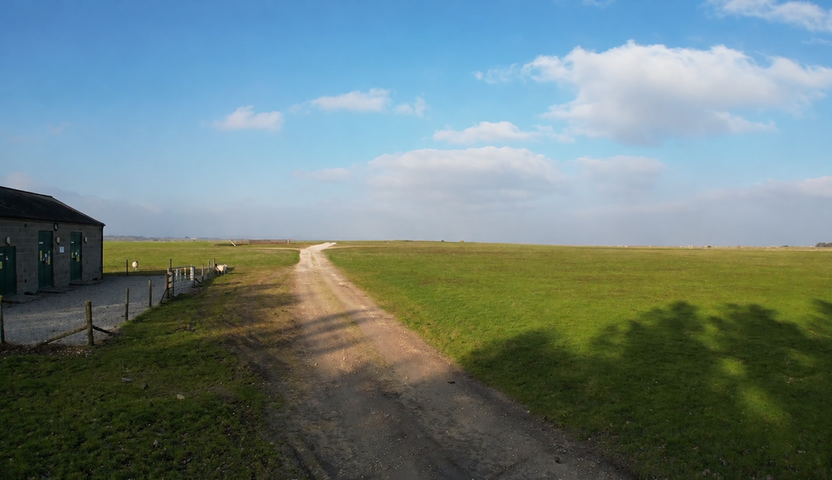
The supplied examples make that preparation concrete. In edit-remove-turbines, the first painted reference shows the desired farmland scene without turbines. It is a target frame supplied to the renderer, not evidence that the model successfully removed turbines throughout the video. Motion consistency and removal in the intervening frames would need to be judged in a rendered clip.

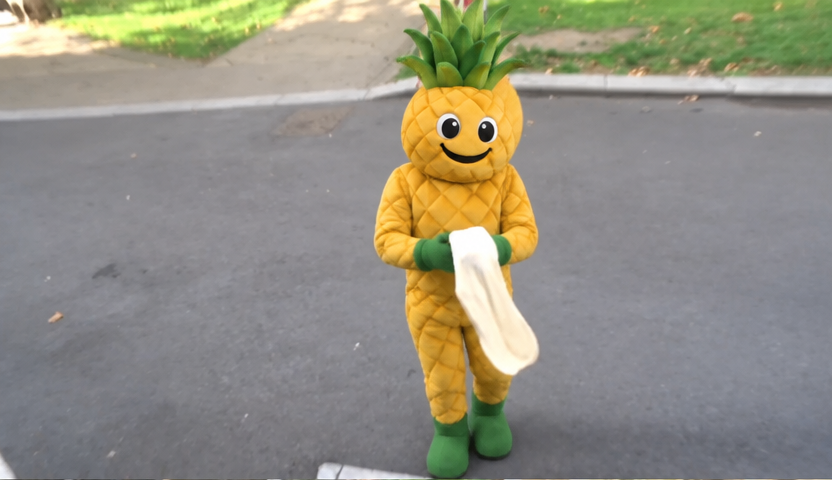
The separate swap-pineapple-mascot example supplies a costumed pineapple character as its first target reference. It illustrates the appearance information that a swap job receives before rendering, rather than demonstrating the quality of the resulting motion. Comparing these two inputs makes the edit/swap distinction visible without mistaking a prepared image for a model benchmark.

Where the new workflow is worth evaluating
The clearest candidate is a user who already has rights-cleared footage, sufficient host RAM and a Linux 32 GB rendering machine, and wants an agent to manage multiple windows rather than queue each graph manually. The new worker supplies a documented bridge between the existing orchestration tools and that machine. Below 32 GB, the current evidence supports experimenting with the manual graph, with explicit limits on resolution, duration and confidence in the emulated memory results.
Output quality still needs inspection at cuts, pinned frames, faces and fine detail. Viggle’s quantization comparisons cover two example clips, and its smaller-memory table comes from the edit example. Numerical similarity to its reference render does not establish universal editing quality or identity reliability. The original audio also carries its own rights and synchronization obligations.
Finally, the code and weights have different licenses. Viggle identifies the code as Apache 2.0 and the weights, including merged quantized files, as derivatives governed by the MiniMax H3 Community License. The exact LICENSE distributed by Viggle excludes the United States, European Union, United Kingdom and Republic of Korea from its Applicable Territory. Its grant is limited to that territory, and Section V.4 also restricts use, reproduction, modification, distribution and display of the works and their outputs outside it. Readers in those excluded territories should not treat a public download as deployment permission; the agreement directs interested deployers to contact MiniMax about a separate license.
Those model terms do not clear the third-party example imagery. Viggle’s example credits expressly retain the underlying owners’ copyrights. The two attributed input images here are retained for limited local editorial review, not offered as openly licensed assets; the publisher must resolve reuse rights before public release. Use consenting subjects and footage you may modify, label synthetic edits, and review the applicable terms before deployment. This article’s checks stop at source retrieval, syntax and graph structure; no models were installed, no paid calls were made and no inference was run.
Sources
- Viggle Remake repository and model card
- Viggle Remake main-branch commit history
- 32 GB worker, download corrections and setup changes
- Painting-default and endpoint clarification
- ComfyUI configuration, quantization and measurement caveats
- MCP architecture and consumer-card worker
- Comfy-Org native MiniMax H3 documentation
- ComfyUI-GGUF loader documentation
- Viggle example imagery credits and underlying owners
- MiniMax H3 license distributed with Viggle, including territorial restrictions
Suggested category: Generative AI
Tags: Viggle Remake, ComfyUI, MiniMax H3, MCP, GGUF, Video Editing