ComfyUI v0.43.0, released on October 27, 2026, brings a useful combination for image-generation workflows: more control over MOSS-Image editing, native Fibo 2.0 support, and utilities for preparing and exporting images. The official release also includes changes to memory handling and a separate expansion of Partner Nodes. Those categories deserve different treatment when deciding whether to update. A local model integration and an external API node can appear in the same graph without having the same operating requirements.
The release is real, rather than a proposed roadmap item. GitHub identifies the tagged build with commit 426f5ee, and the independently maintained Local Model Watch release table also records v0.43.0 on October 27. That corroborates the event date, although the tracker explicitly derives its release history from GitHub and is not an independent technical evaluation.
This article examines the implementation notes and their practical implications. It does not report hands-on generation tests, measured image-quality improvements, or a universal speed increase.
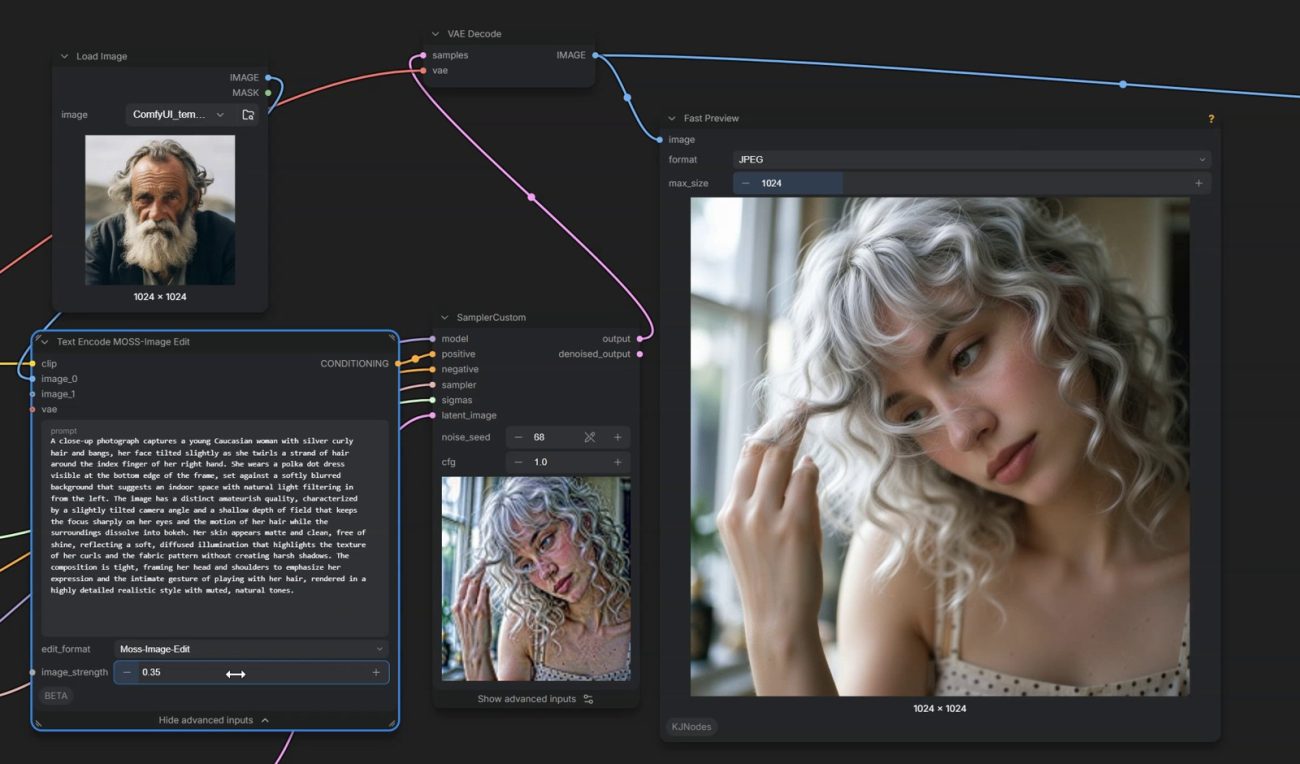
MOSS editing gains a control for reference-image influence

One particularly useful change addresses an editing problem that is easy to mistake for a weak prompt. In pull request #17320, contributor kijai explains that images passed through the MOSS-Image text encoder’s vision tower could dominate the text instructions, even at CFG 1. The change introduces attention-bias conditioning and exposes an image_strength setting in Text Encode MOSS-Image Edit.
The documented behavior is specific: zero ignores the images in this vision-token weighting mechanism, one retains the previous weighting, and values above one emphasize them. The implementation applies an additive bias to conditioning tokens, while image and reference keys remain unbiased. This distinction matters because the setting is not described as a universal replacement for every other image-conditioning input in the graph.
Editorial analysis: when an edit preserves too much of its reference, this provides a more targeted variable to investigate than repeatedly lengthening the prompt. A sensible comparison would keep the source image, instruction, seed and sampling settings fixed while changing this control. That is a proposed evaluation method, not a result measured here.
Edit LoRAs need the matching reference layout
The related MOSS-Image edit-LoRA integration is more than a loader accepting another filename. Pull request #17296 adds reference latents to the model and provides several layouts corresponding to different training arrangements. The author distinguishes ai-toolkit configurations with and without KV caching, a layout for chinoll/Moss-Image-Edit, and a layout that uses the image’s timestep.
The same contribution introduces the experimental Text Encode MOSS-Image Edit node. For ai-toolkit LoRAs, it also sends reference images through the vision tower in the arrangement used during training. References receive padding to the embedder width so they can coexist with the color/depth control adapter.
Editorial analysis: a workflow that loads without an error is not necessarily configured in the way its edit adapter expects. When sharing a graph, record which adapter it uses and which reference layout it selects. Otherwise, a recipient may reproduce the visible node structure while missing the training assumption that informed it.
This is also why an older custom workflow should not be rewritten wholesale merely because native support exists. First compare the required inputs and defaults, then decide which parts can be replaced.
Native Fibo 2.0 support is separate from hosted access
Pull request #17240 adds native support for Bria Fibo 2.0 Dev text-to-image generation and Edit Turbo image editing. Its implementation notes identify a Qwen3-VL-4B text encoder, the FLUX.2 VAE and a TextEncodeFibo2 node that produces positive and negative conditioning with reference latents. These are concrete components to check when assembling a local workflow.
The contributor lists different starting settings for the two variants: Edit Turbo at four steps with CFG 1, and Dev at 30 steps with CFG 5, using euler and simple. Treat those as the integration author’s documented settings, not proof that every prompt or machine should use them. The pull request also reports implementation-parity checks against a reference pipeline; those are upstream checks, not tests performed for this article.
Editorial analysis: the useful question for an existing setup is whether its files and encoding path match the intended variant. Copying settings between Dev and Edit Turbo without checking the workflow would hide a meaningful difference in the integration. Native support establishes an execution path; it does not establish a quality ranking against another model.
Fibo fixes make old workflow comparisons less straightforward
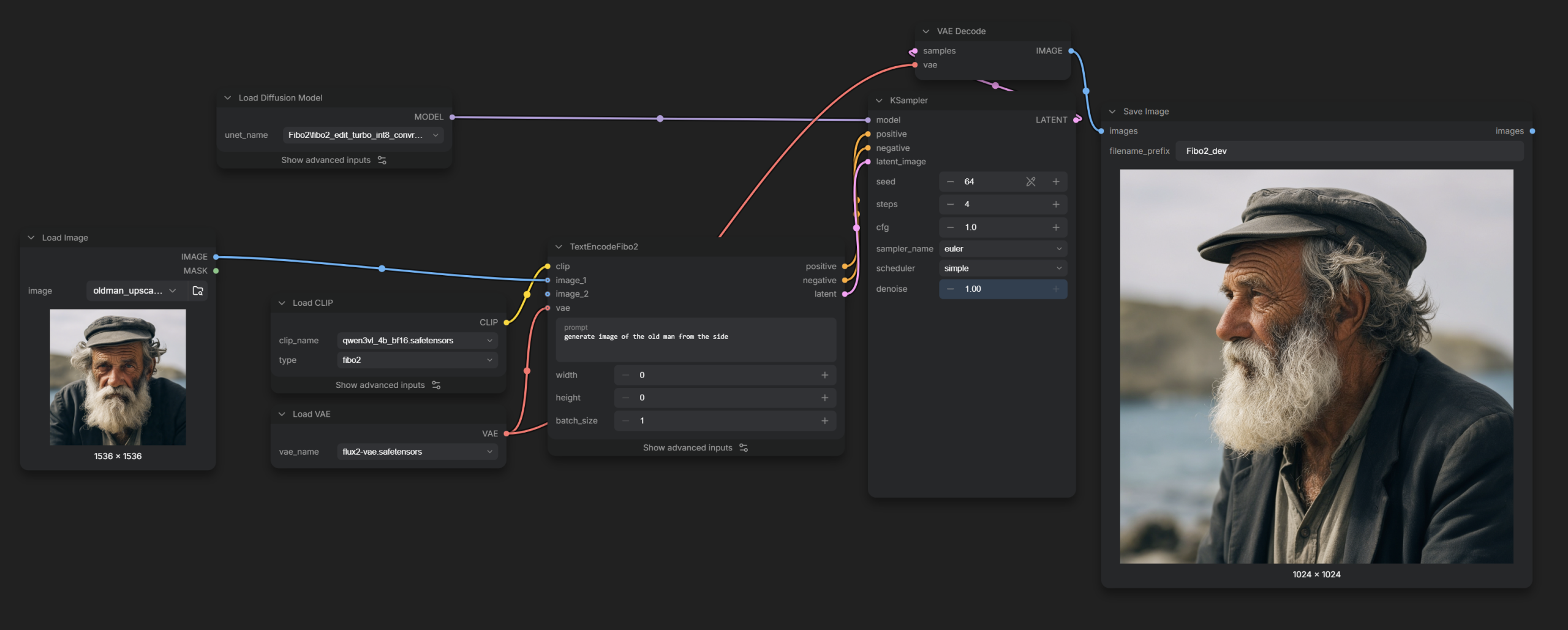
The release includes two follow-up Fibo changes: an adjustment to NTK-aware RoPE scaling and a correction to text-to-image negative-prompt handling. Both appear as distinct merged changes in the official release history, rather than being features inferred from a community screenshot.
Editorial analysis: if an older Fibo workflow changes its output after an update, the model file is not the only variable worth checking. Encoding and positional-scaling behavior belong in the comparison record too. Keep the earlier graph and its environment details before treating a changed output as evidence of a regression or improvement.
A negative prompt is especially unsuitable for an undocumented comparison. If one run uses corrected handling and another does not, identical text in the interface does not establish equivalent execution. A useful report would include the application version and identify whether the comparison involves text-to-image or editing.
The release notes verify that these corrections shipped. They do not supply a general percentage improvement in adherence, an across-model benchmark, or evidence that every previous workflow was affected. None of those claims should be attached to the update without additional testing.
Pad Image addresses a practical preparation problem
The new Pad Image node offers padding by explicit dimensions, a multiplier or a required multiple, with color and mirror-image styles. The contribution preserves the input dtype and device without clamping values, and leaves existing pad nodes unchanged. That makes it a separate utility rather than a silent change to every padding operation.
Contributor DoronGenzelHass explains the motivation through models such as LTX, which require dimensions that are multiples of 32. Padding and then cropping back can retain the requested final resolution, while mirrored content offers an alternative to a solid-color border. The author’s preference for mirror padding is a development rationale, not a comparative benchmark reproduced here.
Editorial analysis: this is relevant when a workflow starts with an image whose dimensions do not match a downstream model’s requirements. Record both the padded dimensions and the crop used to restore the frame. A successful generation at the intermediate size does not, by itself, confirm that the final framing matches the source.
For image editors, preserving the original composition may be a more useful acceptance criterion than simply avoiding a dimension error.
ACEScg export comes with a preview caveat
Another contribution adds HDR ACEScg as a source and destination in Convert Image Color Space and as an EXR input-color-space option in Save Image (Advanced). The implementation uses scene-linear AP1 primaries with an ACES/D60 white point and writes the corresponding chromaticity metadata. It also preserves values above one.
The contributor describes a concrete limitation: the asset preview treats EXR pixels as Rec.709 linear, which can make an ACEScg preview look somewhat desaturated. The contribution states that the saved file is correct. That is an upstream implementation statement, not an EXR verification conducted for this article.
Editorial analysis: review the intended interchange file in the receiving color-managed application before correcting saturation to compensate for a thumbnail. Otherwise, an adjustment aimed at the preview could change the deliverable unnecessarily. Include the chosen color space in the handoff notes rather than assuming the file extension communicates it.
For readers who only export ordinary display images, this is a specialized workflow addition. It is relevant to a color-managed handoff, not evidence that all generated images now have a wider usable gamut.
Branch selection and memory management solve different problems
The Branch node lets a graph connect an arbitrary number of inputs and select a path by name. Its pull request also identifies a frontend dependency. This is a reminder that the backend release number alone does not describe every piece involved in presenting a new node correctly.
Editorial analysis: named paths can make an experimental graph easier to read. A creator could label alternatives according to the workflow’s actual choices instead of relying on cable tracing. That is an organizational use case, not a claim that a branching graph necessarily runs faster. Keep path names meaningful when exporting a graph for someone else.
Memory work has a different purpose. Pull request #17274 introduces Comfy-Aimdo 0.6.0 and dynamic VRAM KV caches, allowing a cache to span GPU memory and host RAM. The contributor says this initial implementation applies the infrastructure to Qwen Image 2.1 and keeps the cache short-lived to the generation. Longer-lived cache input/output, save/load and full Qwen 3.x LLM support are described there as later work.
That boundary matters. The existence of dynamic cache infrastructure should not be rewritten as a claim that this release already provides persistent chat-state saving everywhere.
Partner Nodes still involve external services
ComfyUI’s official documentation defines Partner Nodes as connections to external API services for hosted or closed-source models. It requires a Comfy account and a positive credit balance for using these nodes. The v0.43.0 notes list new integrations alongside native model changes, including Bria FIBO 2.0 Generate/Edit nodes. Those entries should not be conflated with the native Fibo implementation.
Editorial analysis: before adopting a shared workflow, classify its generation steps by where they execute. For each hosted step, check what inputs it sends and whether the relevant account and credit requirements suit the job. A familiar canvas does not remove the distinction between running model files locally and submitting an API request.
This distinction also changes how to interpret a missing-node problem. A graph that expects a hosted node is not automatically repaired by downloading local weights, and a native graph is not automatically configured by signing into an account. Identify the node family before replacing components. This article does not quote service prices or claim that any paid generation was executed.
A release-focused update should preserve a comparison baseline
The official update guide distinguishes Portable, Desktop and manual installations. For Portable, it lists separate scripts for development and stable updates. It warns that the more extensive Python-dependency update can introduce conflicts, break custom nodes or overwrite configured packages, and recommends backing up the installation and recording custom package versions before that operation.
Editorial recommendation: use the update route appropriate to the installation, and decide whether the target is this tagged release or newer development code. Those are different experiments. Preserve a working graph and environment record before comparing outputs, particularly when evaluating the MOSS editing controls or Fibo changes described above.
Choose an acceptance check that matches the work. An editing comparison should ask whether the requested attribute changed while important reference details survived. A padding check should inspect the restored crop. An ACEScg handoff should inspect the exported file in the receiving pipeline. These are proposed checks, not completed benchmarks.
ComfyUI v0.43.0 gives users specific controls and integration fixes to evaluate. The strongest reason to install it is a documented change that addresses a workflow you actually use. Keep the previous working setup available until that particular workflow has passed its own comparison.
Sources
- Comfy-Org, ComfyUI v0.43.0 official release
- Local Model Watch, ComfyUI: Releases and Overview
- kijai, Add attention bias conditioning and image strength for MOSS-Image edit, PR #17320
- kijai, Support MOSS-Image edit LoRAs, PR #17296
- kijai, Add Fibo 2.0 support, PR #17240
- DoronGenzelHass, Add Pad Image node with mirror padding and pad to multiple, PR #17224
- DoronGenzelHass, Add ACEScg to Convert Image Color Space and Save Image (Advanced) EXR, PR #17023
- AustinMroz, Add a Branch node, PR #16383
- ComfyUI documentation, Partner Nodes
- kijai, Fibo 2.0: Change RoPE scaling to NTK aware, PR #17290
- kijai, Fix Fibo2.0 T2I negative prompt handling, PR #17285
- rattus128, Comfy-Aimdo 0.6.0 + Dynamic VRAM KV caches part I, PR #17274
- ComfyUI documentation, How to Update ComfyUI