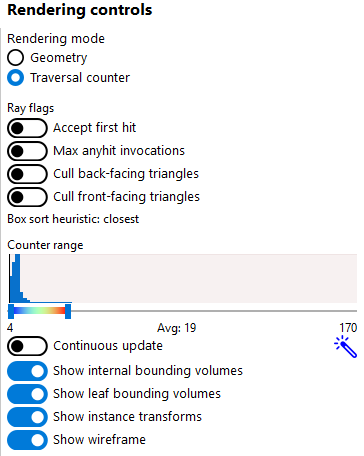

AMD’s Radeon Raytracing Analyzer 1.11.1 adds a way to ask how much traversal work a scene can generate when non-opaque triangle intersections keep getting rejected. Released on October 6, the update puts a Max anyhit invocations switch in the tool’s Traversal Counter rendering mode. It is a diagnostic experiment for graphics developers, rather than a setting that makes a game run faster.
The change is useful because a ray touching a triangle does not always mean the search is over. A non-opaque intersection can require an any-hit shader to decide whether that candidate counts. RRA’s new switch forces those non-opaque triangle intersections to be rejected, emulating the maximum possible number of any-hit shader invocations. It lets a developer examine a deliberately demanding traversal case instead of relying only on the ordinary closest-hit view.
Rejection changes where a ray can stop
Microsoft’s DirectX ray-flag reference explains the underlying distinction. Treating intersections as opaque skips any-hit shaders. Treating them as non-opaque allows an any-hit shader, when present, to execute. An accept-first-hit ray can stop after its first accepted intersection, but an any-hit shader that calls IgnoreHit lets the ray continue. The behavior of that shader therefore affects how much of the scene the ray may still need to search.
RRA exposes this distinction as a controlled visualization. The documented Accept first hit switch simulates that separate ray flag; Max anyhit invocations changes how non-opaque triangle candidates are handled. The official control-panel image above shows both switches. Neither label should be read as a measurement of the time spent executing a particular game’s shader code.
That separation matters when interpreting a hotspot. A region that requires more traversal work under forced rejection identifies geometry worth investigating under that condition. It does not establish that the shipping application takes the same path for every ray. The relevant follow-up is to connect the region to the application’s real intersection decisions, rather than assume the diagnostic setting reproduces its materials.
The versioned manual gives developers several views of that work. Loop count records iterations through the acceleration structure; box and triangle counters separate tests, hits and misses. Those are different questions about the same scene. A high loop count locates work, while the more specific counters can help explain which tests contribute to it. RRA also exposes the bounding-volume hierarchy, so a developer can relate the heatmap to the structure used to organize scene geometry.
A heatmap needs a scale, not just a color
RRA lets the user choose the counter range that maps values to colors. Its automatic range adjustment can follow the visible viewport as the camera moves. Consequently, a red patch in one view is not automatically comparable with a red patch in another: the range may have changed. For a comparison with the new switch enabled and disabled, retaining the same camera, counter type and displayed range makes the visual difference easier to interpret.
The manual also draws firm boundaries around these counters. RRA calculates them on the fly; they are not the counters supplied by Radeon GPU Profiler. They do not account for acceleration-structure build time, and the documented visualization does not follow subsequent rays launched after the closest hit. A traversal picture is therefore one part of a performance investigation, not a substitute for timing the application’s full rendering workload.
This is a different stage of game performance from preparing shaders before play. Here, the question is how scene structure and intersection handling affect a ray’s search. The new switch gives that investigation a specific counterfactual: what happens to traversal when non-opaque candidates cannot end it?
SekaiTech compared AMD’s release notes and versioned manual with Microsoft’s ray-flag reference; it did not capture a game or benchmark RRA. Version 1.11.1 is available through AMD’s Radeon Developer Tool Suite. Its useful output is a location and an explanation to test against the real application, not an FPS gain implied by the update’s version number.