
Pruna P-H3-Image, released on November 3, 2026, turns MiniMax-H3’s video-model foundation into an open-weight system for still-image generation and editing. The release targets eight-step sampling and high-resolution images, with a quantized ComfyUI configuration that Pruna reports can operate at about 21 GB of GPU memory. That is a deployment claim for a particular configuration, not the memory requirement of every P-H3-Image pipeline.
The useful development is the separation of an image workflow from a much larger audiovisual model. Pruna has changed the text-conditioning path, sampling schedule and decoder rather than simply exposing a single-frame option. For creators evaluating the release, however, the component boundaries matter as much as the headline reduction: the prompt upsampler adds storage and processing, the Diffusers package is substantially larger, and the inherited license restricts where the model can be used.
This analysis follows the November 3 announcement, checked on November 4. Same-day Hugging Face discussions show questions about LoRAs and prompt-processor behavior, while ComfyUI has published a release containing native support. Those are concrete signs of activity, not evidence that the model is broadly adopted or viral. The announcement remains a previous-day release, not a launch that happened today.
What P-H3-Image changes in the MiniMax-H3 pipeline
MiniMax’s own model card describes H3 as an audiovisual generation system. Pruna’s derivative has a narrower purpose: its P-H3-Image model card explicitly says that it generates single images, not video or audio. It supports text-to-image generation and image editing, with the documentation favoring roughly eight-megapixel output. The shared H3 name therefore describes model ancestry, not interchangeable capabilities.
According to Pruna’s technical announcement, the conversion involved several different interventions. The company distilled H3’s large text encoder into a smaller encoder, adapted the noise schedule for image detail, reduced sampling from 50 steps to eight, and trained a decoder to turn a single latent frame into a sharp still image. It also describes replacing a large timestep-processing block and supplying quantized components.
These changes address different costs. Fewer sampling steps reduce repeated denoising work. A smaller encoder reduces the resources needed to interpret a prompt. A dedicated decoder addresses the mismatch between decoding a video segment and decoding one image. This distinction is useful when assessing performance claims: a speedup attributed to the complete conversion cannot automatically be reproduced by changing a sampler setting on the original H3 checkpoint.
The published packages are not identical representations, either. The announcement describes a backbone reduction from 33 billion to 20 billion parameters, while the Diffusers model card still lists a 33.1-billion-parameter transformer and a roughly 100 GB bf16 package including other components. The ComfyUI card documents the smaller deployment sets. These descriptions should not be compressed into a claim that every download contains the same reduced backbone.
The 20 GB download is not the complete prompt-assisted setup
The ComfyUI repository provides the clearest breakdown of the compact configuration. Its advertised 20 GB set contains the diffusion model, text encoder and VAE, using w4a8 files where available and an int8 VAE. The card reports a peak of approximately 21 GB of VRAM at eight megapixels for that set. Both figures belong to that combination of components and runtime, rather than to the full family of available files.
The prompt upsampler is separate. Pruna lists it at 19.3 GB in bf16, 9.7 GB in int8 and 6.7 GB in w4a8. The compact quickstart includes the bf16 upsampler in addition to the advertised 20 GB core set. A reader budgeting storage from the headline alone would therefore miss a substantial download. The smaller upsamplers also have their own quality and timing trade-offs, so choosing the smallest file is not a neutral substitution.
GPU residency works differently from storage. The ComfyUI card says the upsampler runs before image generation and moves out of VRAM when the image model needs memory. Its result is cached until the request or input images change. Consequently, adding the sizes of all checkpoint files does not produce an accurate peak-VRAM estimate. Conversely, seeing a 21 GB peak does not mean the entire workflow needs only 21 GB of disk space or has no loading overhead.
The standard Diffusers path is a different proposition. Its model card reports approximately 101 GB of GPU memory at eight megapixels with the prompt upsampler, or 83 GB without it, and describes an offloading configuration with a lower peak. Those are vendor-reported measurements, not tests performed for this article. They explain why the availability of downloadable weights does not make every integration route equally accessible.
Why eight megapixels is part of the quality decision
Pruna recommends eight-megapixel generation because lower resolutions produce more artifacts in faces, hands and small details. The model card’s standard square size is 2912 by 2912 pixels, with other documented aspect ratios. Its release article also shows lower- and higher-resolution results, but eight megapixels is the recommended operating point rather than a guarantee that every image will be correct.
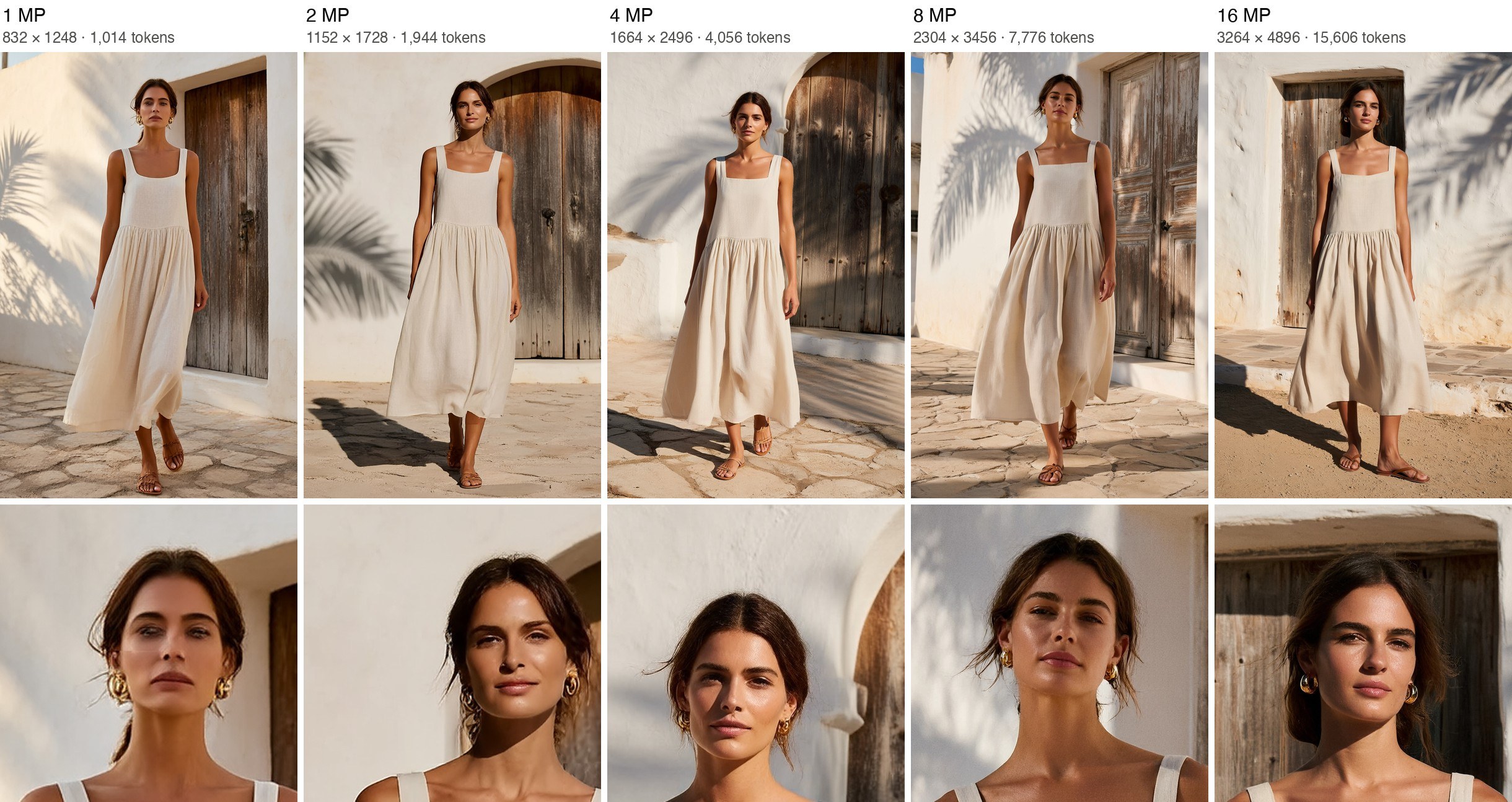
The resolution ladder deserves a careful reading. It presents the same prompt and seed at different output sizes, with enlarged facial crops underneath. Pruna notes that the composition changes because the noise changes with image dimensions. The figure illustrates the company’s resolution guidance, but it does not hold every visual variable constant. It cannot establish a general quality score or prove that increasing resolution fixes a particular failure.
For a production evaluation, that suggests keeping output dimensions fixed while comparing prompts or precision formats. Otherwise, a changed pose, framing or lighting decision can be mistaken for an improvement in detail. This is an evaluation recommendation derived from the source’s stated limitation, not a claim that the release has been benchmarked here. The published examples are useful for identifying what to inspect, especially skin texture, fingers and small figures.
The prompt upsampler is part of the image behavior
P-H3-Image includes a prompt upsampler based on Qwen3.5-9B. In the Diffusers pipeline it is enabled by default; in the supplied ComfyUI workflows it generates a more explicit prompt before sampling. Pruna describes the model as sensitive to prompt construction, with short requests benefiting from expansion and very long or hype-heavy prompts causing problems. This makes the upstream text transformation part of the system being evaluated.
For reproducibility, the expanded prompt matters alongside the original request. Pruna’s Diffusers documentation allows that generated prompt to be returned as an output. If two runs use the same short sentence but different prompt-processing configurations, they need not be equivalent inputs to the image model. Recording only a seed and the visible request would leave an important part of the comparison undocumented.
The ComfyUI card also separates prompt-processing time from image-generation time. It reports about seven seconds per prompt on an L40S for the bf16 upsampler, with different timings for quantized variants. Cached prompts can avoid repeating that stage, but a new request or changed image inputs can trigger it again. Fast repeated generations from a cached prompt should therefore not be reported as the latency of a fresh request.
Editing is promising, but preservation needs explicit instructions
The release supports editing an existing image and incorporating additional visual references. There is a documentation mismatch worth preserving: the announcement mentions up to nine input images, while both retrieved model cards describe up to eight. The ComfyUI instructions specify one image to edit and up to seven references. Until those descriptions agree, eight total inputs is the conservative documented capacity, not nine references plus a base image.
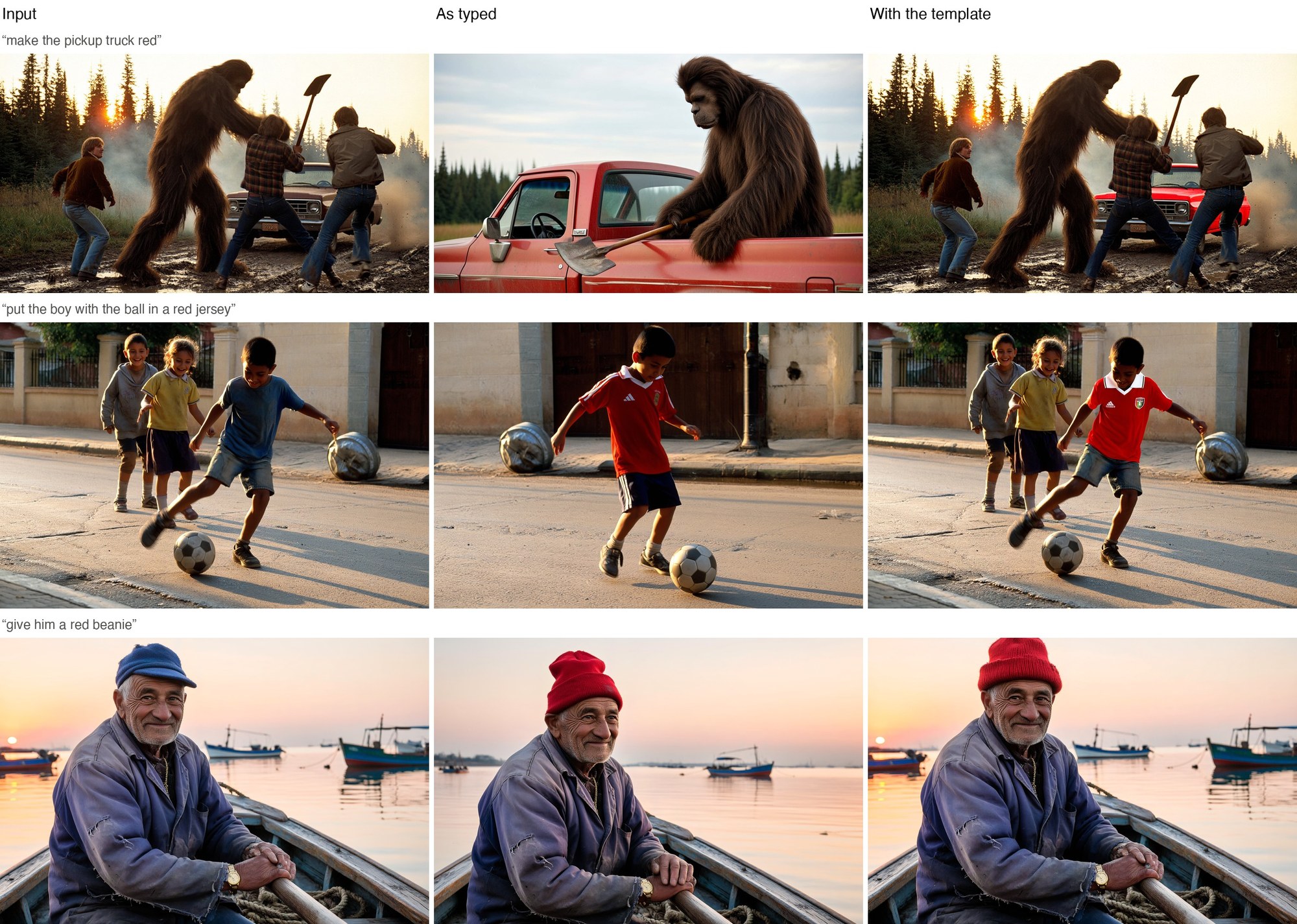
Pruna’s editing examples show a practical weakness behind that capability. A short request to change a truck’s color can redraw the surrounding scene, while a more explicit edit brief preserves more of the original composition. The model card recommends identifying the edited picture, describing the finished change and specifying what must stay unchanged. Its upsampler is designed to construct that kind of brief from a shorter request.
Reference support should therefore be judged on preservation as well as visual appeal. For an image-editing task, the useful question is whether the requested change happens without replacing important faces, poses or background details. A convincing fresh composition is not automatically a successful localized edit. The source examples motivate that distinction, but they do not provide a measured success rate across a representative editing dataset.
Text rendering has a similarly narrow scope. Pruna recommends short, explicitly quoted strings and warns that small or dense text can become pseudo-text or contain incorrect letters. The documented strength in graphic styles does not establish reliable long-form typography. A poster concept and a page of accurate body copy remain different evaluation tasks.
Native ComfyUI support has moved beyond the launch instructions
The retrieved ComfyUI model card says native support is on the master branch and will arrive with the next release. By the November 4 check, that sentence was behind the release record: ComfyUI v0.44.0, published at 01:12 UTC on November 4, includes the PH3Image support change. The associated merged implementation pull request documents the core integration.
This confirms inclusion in the tagged core release, not successful operation on every desktop bundle or hosted deployment. Distribution channels can package core, frontend and templates on different schedules. The supplied workflow files also retain node metadata mentioning 0.43.0, which is not sufficient evidence that an older installation contains the new conditioning node. The release record is the stronger compatibility signal.
For developers, Pruna’s other route is a Modular Diffusers pipeline. Hugging Face’s Modular Diffusers overview describes a block-based system in which processing stages can be composed or changed. That helps explain how the prompt-upsample stage can be separated from image generation. It does not establish version compatibility beyond Pruna’s published instructions, and no library installation or inference run was performed for this analysis.
Performance numbers need their configuration attached
Pruna’s launch table reports 2.6 seconds for a four-megapixel image on one B200, compared with 12.4 seconds for MiniMax-H3, and 5.8 seconds for its eight-megapixel result. The announcement identifies a 50-step versus eight-step comparison without further optimizations. These are Pruna’s measurements on specified hardware, not an independent speed ranking against other image models.
The Diffusers model card reports about nine seconds for eight-megapixel text-to-image with a prompt used as written, plus another six to eleven seconds for its upsampler. Those figures differ from the launch table and belong to a separately documented pipeline. The sources do not fully reconcile their timing boundaries. Quoting the fastest number as universal end-to-end latency would hide both that discrepancy and the prompt-processing stage.
Quantization introduces another comparison boundary. Pruna says int8 remains close to bf16, while w4a8 can change fine details and sometimes composition. A lower-memory image that looks good is not necessarily pixel-equivalent to the larger version. Teams considering the compact set should evaluate the precision they intend to deploy rather than assume that a bf16 showcase proves identical behavior for every smaller file.
Open weights come with territorial and commercial limits
The MiniMax H3 Community License supplied with P-H3-Image limits its grant to an applicable territory that excludes the European Union, United Kingdom, Republic of Korea and United States. It describes a separate licensing route for deployment in excluded territories. Public download access should not be treated as a worldwide permission to run or deploy the model.
The actual license also warrants reading rather than relying on a summary. It encourages a product notice using the phrase Powered by MiniMax H3, while separately requiring commercial products or services using the works to display MiniMax H3 prominently in their interface. It also sets a separate-authorization threshold for commercial products and services generating more than US$20 million in yearly revenue. These are statements about the retrieved terms, not legal clearance for a particular deployment.
The repository’s NOTICE file distinguishes the MiniMax-derived components from Apache-licensed Qwen-derived parts. That component-level licensing does not turn the complete image model into an unrestricted Apache release. Nor does it establish permission to reuse every demonstration image. The illustrations accompanying this local analysis retain their source provenance and require a publisher’s rights review before public reuse.
P-H3-Image is worth evaluating as a specialized still-image derivative with documented compact ComfyUI configurations. Its practical case rests on the exact component set, prompt stage, output resolution and licensing situation a team will use. The next useful evidence is reproducible performance and editing-preservation testing under those conditions, rather than a larger claim built from the release’s smallest download or fastest timing.
Sources
- Pruna AI: November 3 P-H3-Image technical announcement
- P-H3-Image model card, examples and Diffusers requirements
- P-H3-Image ComfyUI files, component sizes and workflows
- MiniMax-H3 base-model documentation
- ComfyUI v0.44.0 release record
- ComfyUI native PH3Image implementation
- Hugging Face Modular Diffusers overview
- MiniMax H3 Community License and Pruna component licensing notice
- November 4 community question about LoRA compatibility and November 4 question about the prompt upsampler
Tags: Pruna AI, P-H3-Image, Generative AI, ComfyUI, MiniMax-H3
Supporting keywords: P-H3-Image ComfyUI, eight-step image generation, MiniMax-H3 image model, prompt upsampler, quantized image model
Search intent: Informational news analysis of the November 3 P-H3-Image release, practical deployment boundaries and documented limitations.